
Day Counter
Counts up since an event, in days, weeks, months or years.
From your organization the app reads: nothing. The app calls no outside service.
This app needs no separate consent.


- For
- anyone who wants to show a running count, such as days without an accident
- Prerequisite
- the app installed, and permission to edit scenes
- Where in the portal
- Apps › Discover apps › Day Counter. The widget is in the scene editor under Time & countdown.
On this page
The Day Counter shows a number that keeps growing, such as “412 days without an accident at work” or “10 years at this location”. It counts by itself and needs no data source.
What the app shows
The app comes with one widget: Day Counter. It counts up since an event, as one large, calm number, and below it always states since when it counts (“since March 12, 2026”). It counts by the calendar in the time zone of the location: Days change at midnight, months on the day of the month, and a year is the anniversary. A day without a time counts from midnight.
Five templates insert the counter at a fitting size:
| Template | Size | Shows |
|---|---|---|
| Compact | 300 × 300 | number and unit, below it since when |
| With heading | 400 × 300 | the heading above the large number, below it since when |
| With target | 560 × 320 | the number with target value (“730 of 1,000”), bar, and what is still missing |
| Anniversary | 640 × 360 | the years in a badge, on the anniversary “10 years ago today” |
| Bar | 1320 × 110 | heading, number, and unit on one line |
Milestones: With “Milestones every 100”, on the day the number reaches 100, 200, 300, “100 days ago today” appears above the number in the accent color, and the number glows in the accent color.
After that, the counter arranges itself to fit its frame. In small frames, the badge drops out first, then the target, then the heading. The number is never cut off.
Settings
Open the settings with the gear icon on the toolbar above the widget. They are on the tabs Content, Appearance, and Data. The toolbar also offers Template and Colors, plus the Background.
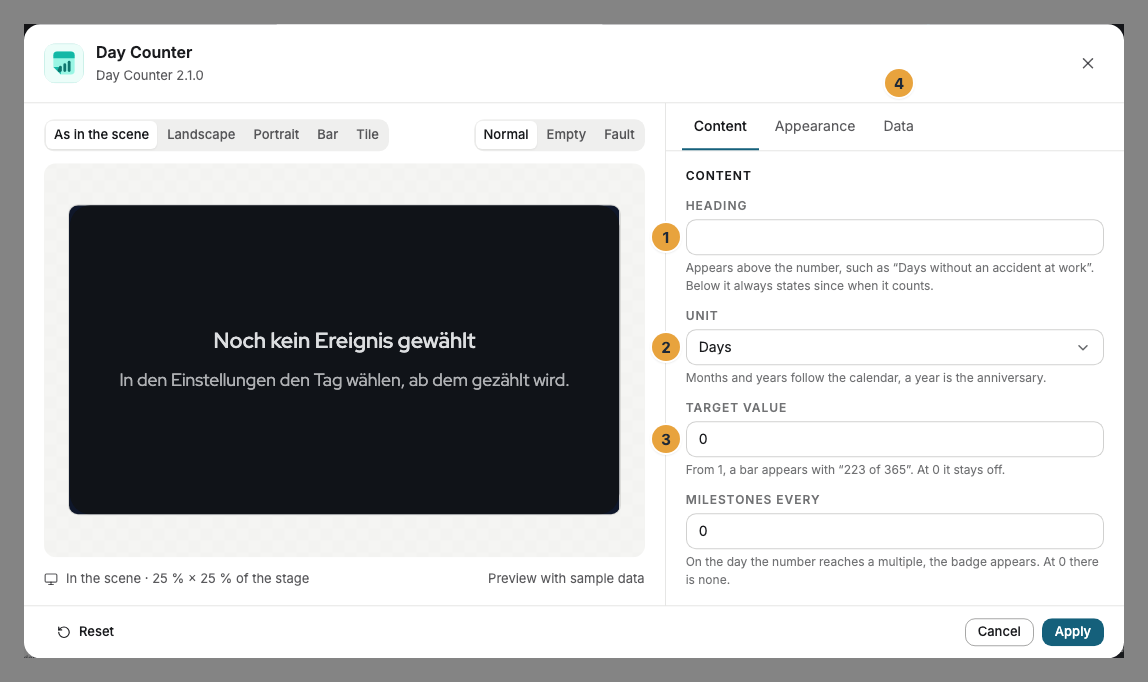
| Setting | Tab | Meaning | Default |
|---|---|---|---|
| Event | Data | The day counting starts from. | none |
| Time | Data | Needed only for hours. Without a time, the day counts from midnight. | none |
| Heading | Content | Appears above the number, such as “Days without an accident at work”. Without a heading, the unit stands beside the number. | none |
| Unit | Content | Hours, Days, Weeks, Months, or Years. | Days |
| Target value | Content | From 1, a bar appears with “223 of 365”. | 0 (off) |
| Milestones every | Content | On the day of a multiple, the badge appears. | 0 (off) |
| Colors and Font | Appearance | Style of the app, Brand colors, or Custom colors, plus the font. See Configure widgets. | Style of the app |
| View | Appearance | Number or Anniversary. | Number |
| Background | Appearance | Dark, Light, Night blue for occasions, Glass, or Transparent. | Dark |
| Corners | Appearance | Rounded or Sharp. | Rounded |
Limits
- Events in the future are not counted down by the Day Counter: Until the event, the display shows only the background. For the time before, use the Countdown.
- Offline: The counter needs no connection and keeps counting without a network.
If something goes wrong
| Symptom | Cause | Solution |
|---|---|---|
| In the editor, it says “No event chosen yet”, the display shows only the background. | No event is entered. | In the settings, choose the Event. |
| In the editor, it says “The event is in the future”. | The day of the event has not been reached yet. | Check the day or use the Countdown until then. |
| The bar is missing. | The Target value is 0, or the frame is too small. | Set a target value or drag the frame larger. |
| The widget cannot be inserted. | The app is not installed, an update is waiting for your decision, or it shows Not in your package. | Check the status under Apps (When an app doesn’t work). |
Related
- Configure widgets: template, preview, and fields
- Countdown — the same idea in the other direction.
- Clock — time and date instead of a number that keeps growing.
Was this helpful?