How the news apps work
You want to know what the six news apps have in common, or which one fits.
- For
- anyone who puts news into a scene
- Prerequisite
- the Pro package, and the app installed
- Where in the portal
- scene editor › palette › News & info
On this page
Six apps bring current news from one newsroom each: Tagesschau, DER SPIEGEL, BILD, NDR, Deutschlandfunk, and BBC News. They share one design, the same settings, and the same behavior without a network. This page covers what they have in common, and each app's own page covers its sections.
Which app fits
| App | Sections | Pictures |
|---|---|---|
| Tagesschau | National and international news, business | Yes |
| DER SPIEGEL | Headlines, politics, business, health, sport | No |
| BILD | Politics, sport, entertainment, advice, technology | No |
| NDR | Northern Germany, each northern state, sport, culture | Yes |
| Deutschlandfunk | One news roundup | Yes |
| BBC News | UK and world news, business, health, technology, in English | Yes |
For several sources at once, or a feed of your own, use the RSS feed.
What they show
A news widget shows one story at a time with its headline, section, and age, and the next story every ten seconds. Up to six stories take turns, and small bars show how many there are and when the next one comes. Each time the scene appears, it starts with the newest story. The header carries the original logo of the newsroom and the time.
When you insert the widget, a template sets its size:
| Template | Size | Shows |
|---|---|---|
| Picture and headline | 1280 × 720 | The picture edge to edge, with the headline over it. Apps with pictures. |
| Headline | 1280 × 720 | The headline large. DER SPIEGEL and BILD. |
| Split | 1280 × 720 | The picture on the left, the story on the right, and the next one below it. Apps with pictures. |
| Square | 600 × 600 | A tile with the headline |
| Portrait | 540 × 960 | The headline large, then the next story |
| List | 640 × 560 | Several headlines one below the other |
| Band | 1340 × 120 | Logo, time, and headline in a narrow strip along the edge of a scene |
After you insert it, the widget adapts to its frame: if you make it smaller, the next story, the teaser, and the section drop out first. Source and headline always stay.
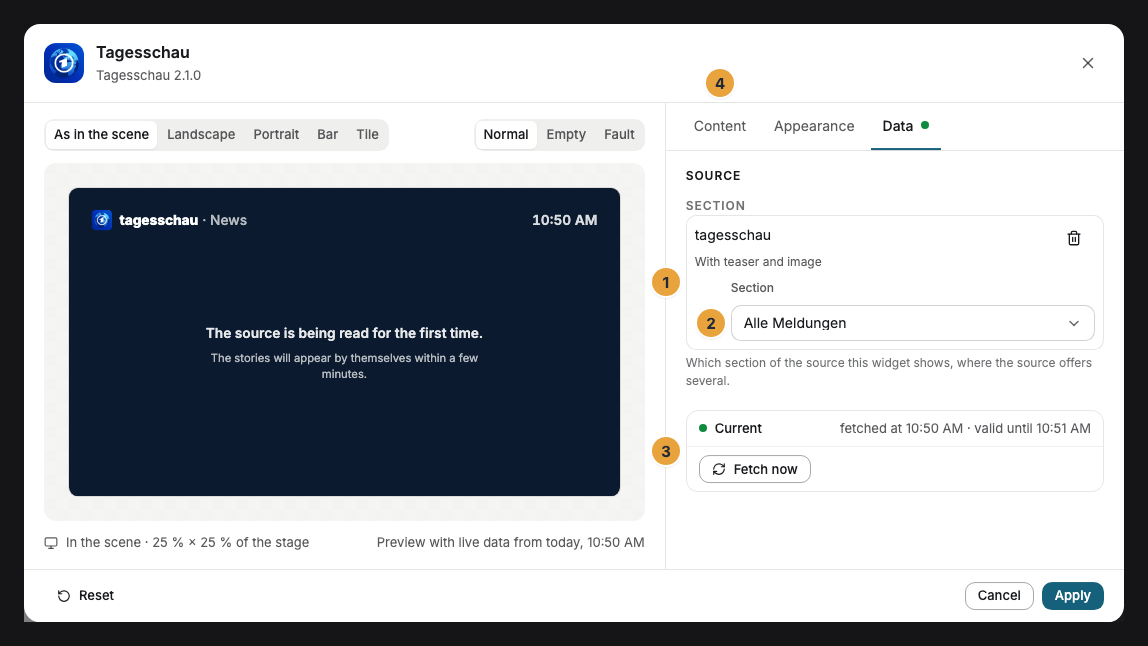
Settings
Open the settings with the gear icon above the widget. They are on the tabs Content, Appearance, and Data. The toolbar also offers Template and Colors, plus Background and View.
| Setting | Tab | Meaning | Default |
|---|---|---|---|
| Sections | Data | Which stories appear. The choice depends on the app. | depends on the app |
| View | Content | One story at a time with a large headline, or Headlines listed one below the other | One story at a time |
| Picture | Content | Large behind the headline, Beside the text, or None. Only apps with pictures. | Large |
| Story age | Content | How old a story is, such as "2 hr. ago" | On |
| Colors and Font | Appearance | Style of the app, Brand colors, or Custom colors, plus the font. See Configure widgets. | Style of the app |
| Background | Appearance | Brand (the newsroom's own color), Light, Dark, Glass, or Transparent | Brand |
| Brand logo | Appearance | The original logo in the header | On |
| Corners | Appearance | Rounded or Sharp | Rounded |
| Maximum age | Content | Under Advanced: stories older than 6 hours, 12 hours, 24 hours, or Two days drop out | Two days |
| Exclude keywords | Content | Under Advanced: up to 20 words. Stories with one of them in the headline don't appear. | none |
The Brand under Background is the newsroom's color, not your own brand. You choose your brand colors under Colors. They apply to the accent, the font, and the Light and Dark backgrounds, and the newsroom's color stays.
Fetching and offline
We read each newsroom every five minutes, once for all customers, and the displays fetch the stories from us. Only the pictures come straight from the newsroom. No data of your organization goes to the newsroom. If a source fails, the last stories stay on the display, and stories older than two days drop out. Without a network, the display shows the last stories it has, without pictures. Nothing on the display is clickable, and stories appear without their full text.
If something goes wrong
| Symptom | Cause | Solution |
|---|---|---|
| No stories at the moment | The source is read for the first time or doesn't respond, or the maximum age and keywords leave nothing. | Open the scene in the editor. The preview names the reason. |
| No pictures | Picture is set to None, or the display can't reach the newsroom right now. | Check Picture. Without a network, stories appear without pictures. |
| The teaser or the next story is missing | The frame is too small. | Make the frame larger, or choose a larger template. |
| The thumbnail always shows the same story | Thumbnails don't rotate. | Nothing to do. The stories change on the display. |
| The widget can't be inserted | The app isn't installed, an update is waiting, or it is Not in your package. | Check the status under Apps, see When an app doesn’t work. |
Related
Was this helpful?