
Word Clock
The time as a sentence in warm glowing letters, in German, regional German or English.
From your organization the app reads: nothing. The app calls no outside service.
This app needs no separate consent.


- For
- anyone looking for a clock with character
- Prerequisite
- the app installed, and permission to edit scenes
- Where in the portal
- Apps › Discover apps › Word Clock. The widget is in the scene editor under Time & countdown.
On this page
The Word Clock shows the time as a sentence that lights up in a grid of letters. It catches the eye and needs no data source.
What the app shows
The app comes with one widget: Word Clock. From a matrix of 12 × 9 letters, the words of the time glow, for example “It is twenty five past ten”, and the remaining letters stay barely visible. The sentence moves in five-minute steps, and four dots below the matrix count the minutes in between. The word clock does not say morning or afternoon. Like every word clock, it counts twelve hours. It takes its time from our servers and shows the time zone of the display’s location.
Three languages, each with its own matrix:
- German — “viertel nach zehn”, “viertel vor elf”.
- Regional German — “viertel elf”, “dreiviertel elf”, “zehn vor halb elf”.
- English — “twenty five past ten”, “quarter to eleven”.
Five templates place the word clock at a suitable size:
| Template | Size | Shows |
|---|---|---|
| Word clock | 540 × 540 | the matrix in warm glowing letters, with the minute dots below |
| Light | 540 × 540 | the same matrix on light paper, without glow |
| With time | 960 × 440 | matrix and time in digits side by side |
| Column | 400 × 760 | the matrix on top, the time below |
| Bar | 1320 × 110 | the sentence as one line |
If a frame is too small for a legible matrix, the time in digits drops out first, and then the sentence appears in two lines instead of the matrix.
Settings
Open the settings with the gear icon on the toolbar above the widget. They are on the tabs Content, Appearance, and Data. The toolbar also offers Template and Colors, plus the Background.
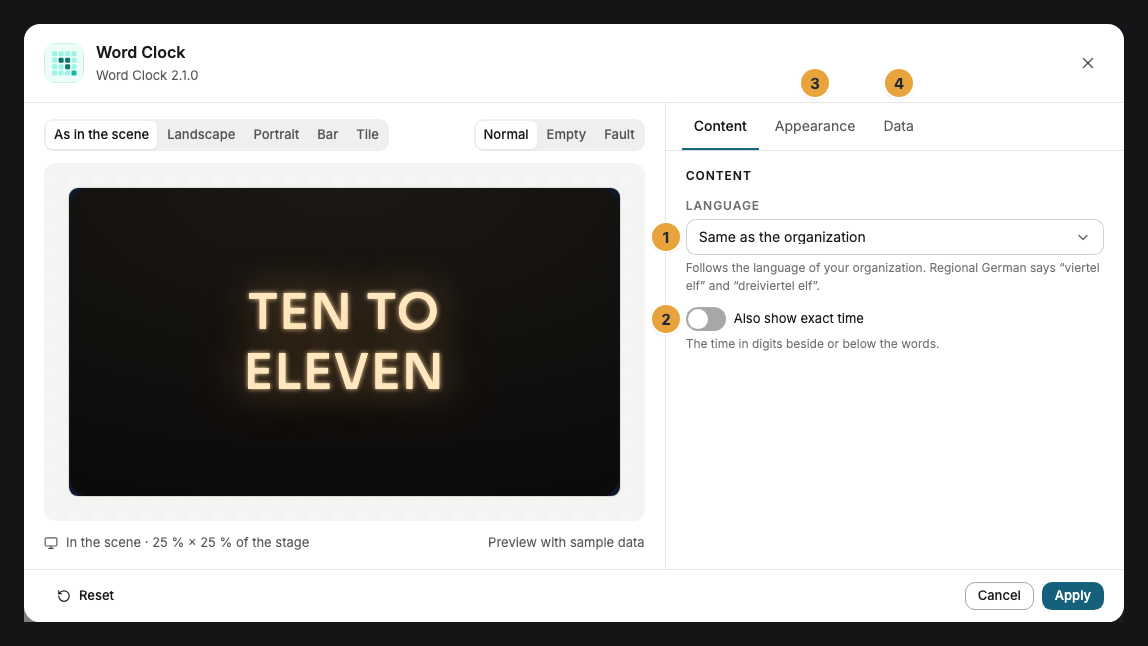
| Setting | Tab | Meaning | Default |
|---|---|---|---|
| Language | Content | Same as the organization, German, Regional German, or English. | Same as the organization |
| Also show exact time | Content | The time in digits beside or below the words. | Off |
| Time zone | Data | Display location, Organization time zone, or Fixed time zone. | Display location |
| Fixed time zone | Data | Only for a fixed time zone: a search across all zones. | none |
| Colors and Font | Appearance | Style of the app, Brand colors, or Custom colors, plus the font. See Configure widgets. | Style of the app |
| Background | Appearance | Dark with a warm glow, Light, Glass, or Transparent. | Dark |
| Corners | Appearance | Rounded or Sharp. | Rounded |
Limits
- Five-minute steps: The sentence jumps every five minutes, and the dots show the minutes in between. For the exact time, switch on the digits.
- Offline: The word clock needs no connection and keeps running without a network.
If something goes wrong
| Symptom | Cause | Solution |
|---|---|---|
| The sentence appears in two lines instead of the matrix. | The frame is too small for legible letters. | Drag the frame larger. |
| The time in digits is missing. | It is off, or the frame cannot hold it beside the matrix. | Switch on Also show exact time or drag the frame larger. |
| The word clock speaks English. | The language follows the organization, and the organization’s language is English. | Set Language to German. |
| The widget cannot be inserted. | The app is not installed, an update is waiting for your decision, or it shows Not in your package. | Check the status under Apps (When an app doesn’t work). |
Related
- Configure widgets: template, preview, and fields
- Clock — the time in digits or as a clock face.
Was this helpful?