
Embed
Embed the code of a provider, such as a map, calm even when offline.
From your organization the app reads: nothing.
The embedded provider: The display loads the embedded content directly from the provider. What leaves your account: The IP address of the display, which the provider learns when it loads.
The app embeds third-party content. The device loads it directly from the outside provider, which receives the network address of the device in the process. You show only what you may play in public, respecting platform terms, rights to music, images and sound as well as GEMA and GVL. You do not get around any access restrictions. We accept no liability for the availability, content, advertising or age rating of outside sources. Read the full terms


- For
- anyone who wants to show content that has no app of its own
- Prerequisite
- the app installed, permission to edit scenes, and the provider’s address or embed code
- Where in the portal
- Apps › Discover apps › Embed. The widget is in the scene editor under Web & video.
On this page
The Embed app shows content that has no app of its own, such as a map, a booking form, a social media post, or a provider’s video. You paste an address or the provider’s embed code.
What the app shows
The app comes with one widget: Embed. It takes the code a provider offers for embedding, exactly as you copied it. The Web page app is intended for an address.
The app recognizes known codes by itself. A code that consists only of an inline frame with an address, the usual form for maps, videos, and calendars, runs like a page with everything it needs. Any other code runs shielded in a document of its own and reaches neither your data nor the display.
Three templates insert the widget at a fitting size:
| Template | Size | Shows |
|---|---|---|
| Embedded | 960 × 540 | the content whole and in its aspect ratio, centered |
| Tile | 540 × 540 | the content filling a square tile |
| Portrait | 540 × 960 | the content filling a tall frame at the edge |
Two examples: A medical practice embeds the map section with the directions. A restaurant shows the booking field of its reservation service at the entrance.
If the network drops, the last loaded state stays, slightly blurred and with the notice “Last updated 02:05 PM · reconnecting”, until the content can be reached again.
On still areas, that is, in the thumbnails of the scene list and in the store, nothing is loaded. There a calm area appears with the kind of content, such as “Map”.
Settings
Open the settings with the gear icon on the toolbar above the widget. They are on the tabs Content, Appearance, and Data. The toolbar also offers Template and Colors, plus the Size.
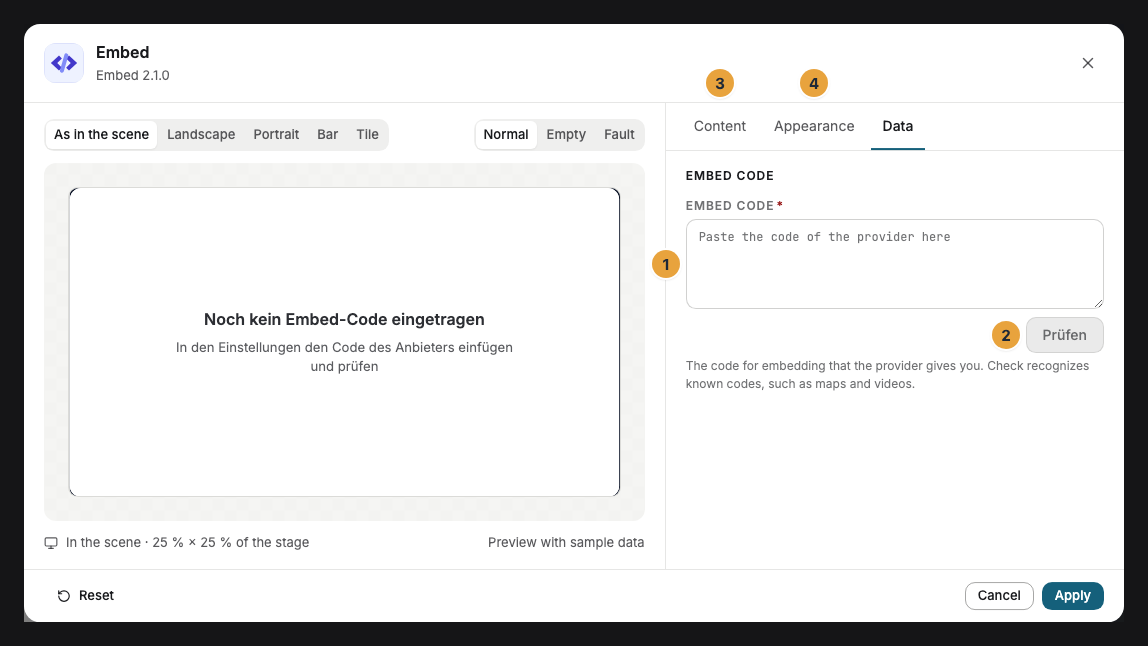
| Setting | Tab | Meaning | Default |
|---|---|---|---|
| Embed code | Data | The provider’s code, exactly as you copied it, at most 10,000 characters. Check shows below it what the app recognized (“Map recognized”), whether the content can be embedded, and on which of your displays it runs. | empty |
| Size | Content | Fit shows the content whole and in its aspect ratio, Fill uses the whole frame, Original size leaves it as large as the code states. If the code states no size, the app measures it itself once it runs. | Fit |
| Colors and Font | Appearance | Style of the app, Brand colors, or Custom colors, plus the font. See Configure widgets. | Style of the app |
| Background | Appearance | Light, Dark, Glass, or Transparent: the surface behind the content while it loads and where it shows nothing. | Light |
| Corners | Appearance | Rounded, growing with the frame, or Sharp. | Rounded |
| Code may run scripts | Content | Under Advanced. Most codes need this. Off means: Only the content appears, and no outside code runs. | On |
Limits
- Not every piece of content can be embedded. Some providers forbid display on other sites. Check tells you beforehand, and the display then shows only the calm area.
- Nothing to operate. The widget accepts no clicks. A form cannot be filled in on the display, and no window opens.
- Addresses belong to the Web page app. Embed does show a bare address as a page, but you choose the view and section only in the Web page app.
- Unencrypted addresses (
http://) in the code are shown only by a display running SzeneraOS. - Not the device itself. Addresses such as
localhostor127.0.0.1and the display address are never embedded, not even from a code. - Outside requests: The outside provider learns the display’s network address with every request. Show only what you may play in public.
If something goes wrong
| Symptom | Cause | Solution |
|---|---|---|
| The widget stays empty on the display. | The provider forbids embedding, the code needs scripts, or it is missing. | Click Check and follow the report. Under Advanced, switch on Code may run scripts. |
| The content appears small with a margin in the frame. | Fit shows it whole in its aspect ratio. | Choose Fill or drag the frame to the aspect ratio of the content. |
| The content is cut off. | Original size is larger than the frame. | Choose Fit or drag the frame larger. |
| Instead of the content, the last state appears with “reconnecting”. | The display cannot reach the provider right now. | Check the network of the display. The display loads by itself as soon as the content can be reached again. |
| A YouTube video does not run as you want. | The player code supports neither repeat nor sound per device. | Use the YouTube app. |
| The widget cannot be inserted. | The app is not installed, an update is waiting for your decision, or it shows Not in your package. | Check the status under Apps (When an app doesn’t work). |
Related
- Web page — for a page by its address, with view and section.
- YouTube — videos and live broadcasts with repeat and sound per device.
- Configure widgets: template, preview, and fields
Was this helpful?