The pairing screen and other messages on the display
The display shows a code or a message, and you want to know what it means.
- For
- anyone standing in front of a display, or taking a call from a location
- Prerequisite
- none
- Where in the portal
- at the TV on site · Displays › Pair display
On this page
A new player shows a six-character pairing code. Once paired, it plays your content, and in a few situations it shows a message instead. This page explains each message and whether you need to do anything.
The pairing screen
A player or web display that doesn't belong to an organization yet shows, from top to bottom:
- Connected: the player is online.
- This display is not assigned yet and the Pairing code, six characters in two groups of three.
- Three steps that lead to Pair display in the portal, which the display calls the back office.
- In small print, the device model with the last four characters of its serial number, and the software version.
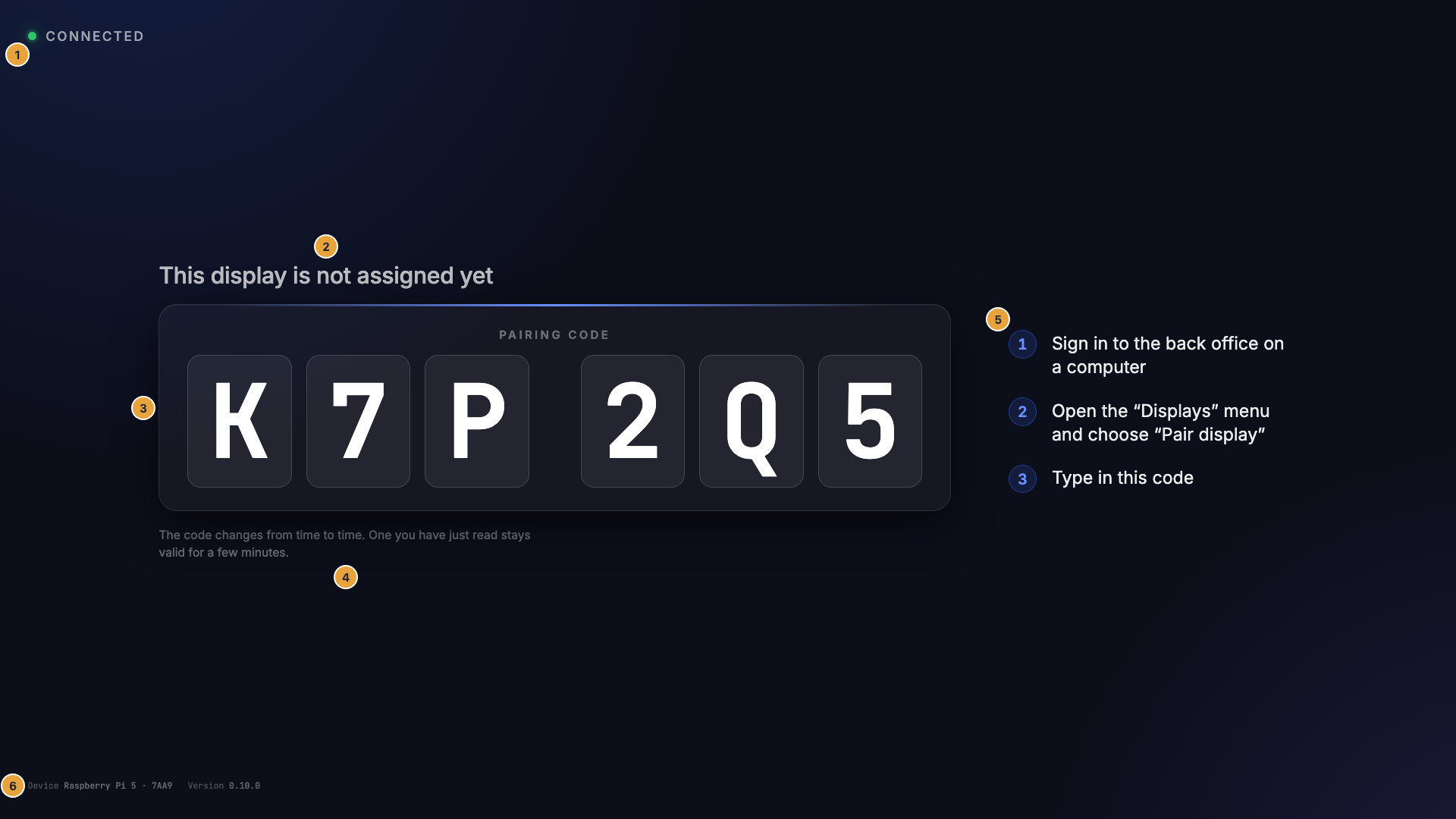
The code consists of capital letters and digits. Characters that look alike, such as O and 0 or I and 1, are left out. The code changes every 60 seconds, and a code you have just read stays valid for five more minutes. If you read it out over the phone, spell out 2 and Z, 5 and S, and 8 and B.
Six empty boxes mean the code hasn't arrived yet, usually because the player has no network. The pairing screen uses the language of the browser. Every other message uses the language of your organization.
Messages and what they mean
| What you see | What it means | What to do |
|---|---|---|
| Loading the program | The display software is starting. | Nothing. It takes a few seconds. |
| No display is set up for this screen yet | A second TV is connected to a player that already belongs to you. | Add the display in the portal, see Player Pro. |
| Your brand as a placeholder | The display is paired, but nothing is assigned or scheduled right now. | Assign content in the portal. |
| Off air with the time when playback resumes | A planned blank period. | Nothing, see Schedule off-air time. |
| No active scene | No program entry applies right now, and there is no base program to fall back to. | Complete the program in the portal. |
| No connection — showing the last known content, small in a corner | The network is down. The display keeps playing what it has stored. | Check the network at the location. |
| Maintenance in progress in a narrow band at the bottom | We have announced maintenance. Playback continues. | Nothing. |
| The whole display pulses blue | Someone clicked Identify in the portal to find this display. | Nothing. It stops after a few seconds. |
| Installing update or Restarting to finish the update | The player is installing an update. | Nothing. The player restarts by itself. |
| Connection closed with a reason | The connection was ended on purpose, see below. | Check the reason in the next table. |
| A black page with a reason and Next attempt in … | The display can't get its content, see below. | Wait, or click Try again now. |
| A setup card with a QR code | The player has no network. | Set up the Wi-Fi, see Connect to the network. |
| Renderer error — please reload. | The display software crashed. This is rare and doesn't harm the device. | Restart the device in the portal with Restart …. |
When the connection was closed
| Reason on the display | When it appears |
|---|---|
| This display’s session has expired. | The display's access could not be renewed. |
| This display’s permission was revoked. | The display may no longer play. |
| This organization’s access is suspended. | Your organization is suspended. |
| Too many requests — the display is pausing. | Too many requests in a short time. This resolves itself. |
| This device is blocked. It was reported lost. Please contact the operator. | The device was reported lost and is blocked. |
| An operator disconnected this display. | We ended the connection manually. |
Apart from the pause after too many requests, nothing at the device needs fixing. Check your organization in the portal, or contact support.
When the display can't get content
The black page names a reason, counts down to the next attempt, and offers Try again now. After several failed attempts, it shows Permanently offline and keeps trying.
| Reason on the display | What it means |
|---|---|
| Service not reachable | The display software can't reach the player it runs on. |
| No content available | The player responds but has no content for this display yet. |
| No response — startup canceled | The player didn't answer in time. |
If the page stays, restart the device in the portal. Troubleshooting: where to start helps with the next steps.
Related
Was this helpful?