Schedule off-air time
A display should stay blank at night or on closing days.
- For
- anyone who wants displays to show nothing at certain times
- Prerequisite
- the Owner or Manager role, and a program
- Where in the portal
- Programs › program › program entry › Content › Off air
On this page
Off air keeps a display blank at planned times, such as at night or on a closing day. The device stays on and keeps reporting in, and playback resumes on its own when the time is over.
Steps
Off air at certain times
- Open the program and drag across the weekly plan for the time without content, or click Program entry.
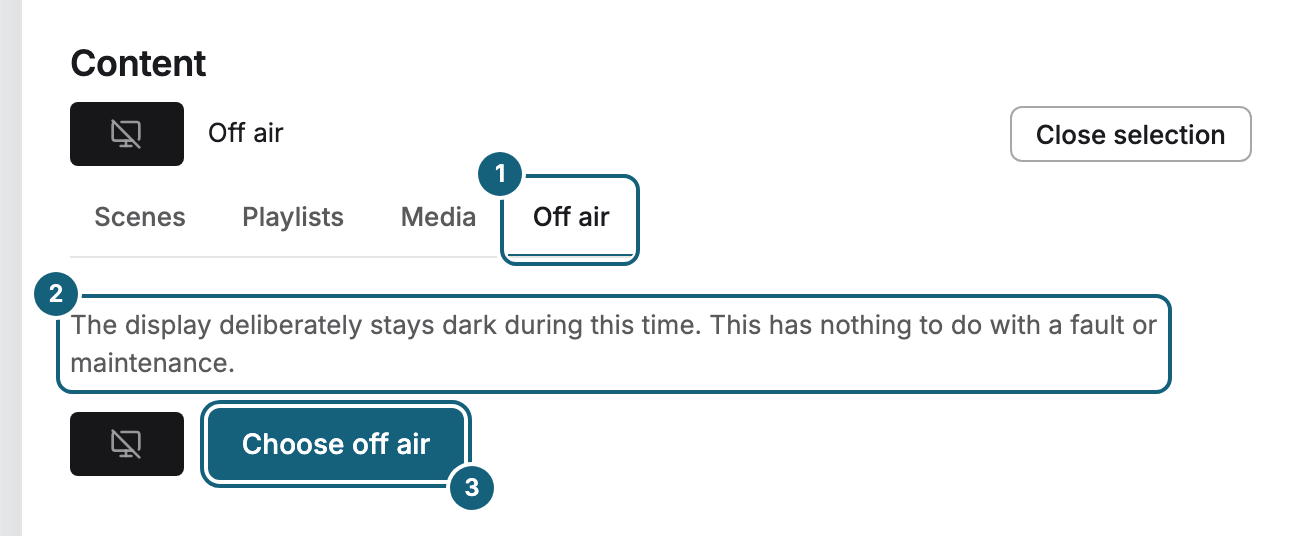
- Under Content, click Change, switch to the Off air tab, and click Choose off air.
- Set Time and Repeat. For the night, that might be 20:00 to 08:00, Daily. The dialog adds The window ends on the following day.
- Click Save.
Off air most of the time
If a display should stay blank most of the time and show something only at planned times, make off air the base program. In the Base program card, click Change, switch to Off air, and click Choose off air. Then add program entries for the times with content.
What the display shows
The display shows Off air on a calm black background, together with the time when playback resumes. The device keeps running and fetching content, so it stays Online in the fleet.
Off air or turning the TV off?
| Off air | Turn off | |
|---|---|---|
| What you see | The off-air notice | A black TV in standby |
| How you set it | Planned in the program, and it repeats on its own | By hand in the Turn the screen on and off card of the display |
| The device | Keeps running and reporting | Keeps running and reporting |
Off air doesn't switch the TV off, restart anything, or install updates. It is a plan, not a fault. Switching the TV off by hand is described in Set up the TV for all-day use.
Check the result
- In the weekly plan, the entry appears in the color of off air.
- In the fleet, the display's tile shows Off air instead of a preview, and the status stays Online.
- On the display's Program tab, the timeline shows the time as Off air.
If something goes wrong
| Symptom | Cause | Solution |
|---|---|---|
| The display shows Off air although it should play | An off-air entry or an off-air base program applies. | Open the entry in the weekly plan and change its time, or switch on Do not play for now. If it is the base program, choose another one with Change. |
| The display is blank, but without Off air | It isn't off air. | See Troubleshooting: where to start. |
| The off-air notice shows no time | No end time was available for the display. | Nothing to do. The off-air time still ends as planned. |
Related
Was this helpful?