Support: where to turn and what to send
You can't get further on your own and want to contact us.
- For
- anyone who is stuck in the portal or at a device
- Prerequisite
- none. Questions about the contract usually need an Owner.
- Where in the portal
- The Support session active band above the content, while a session is running
On this page
For anything about your displays or the portal, write to support@szenera.com. This page lists the other addresses, what to include so we can help quickly, and the cases only we can solve.
The channels
| Concern | Address |
|---|---|
| Devices, portal, questions about use | support@szenera.com |
| Taking back an old device (free, with a return label) and source code for a device | support@szenera.com |
| Setting up purchase on account | abrechnung@szenera.com |
| Refund instead of offsetting a credit note | rechnung@szenera.com |
| Reporting a security vulnerability | security@szenera.com |
Szenera handles security reports under the principle of coordinated disclosure. Receipt is usually confirmed within 24 hours, and a first assessment is aimed for within 72 hours. These are guideline values, not promised deadlines. Helpful details are the affected address or component, the steps to reproduce, and the impact.
How fast and by which route a reply comes depends on the package: Starter includes support by email, Pro adds support by phone, and Premium adds a reply on the next business day.
What to send along
| Case | What you attach |
|---|---|
| A display does not show what it should | The name of the display, the time of the incident, and the screenshot from the portal |
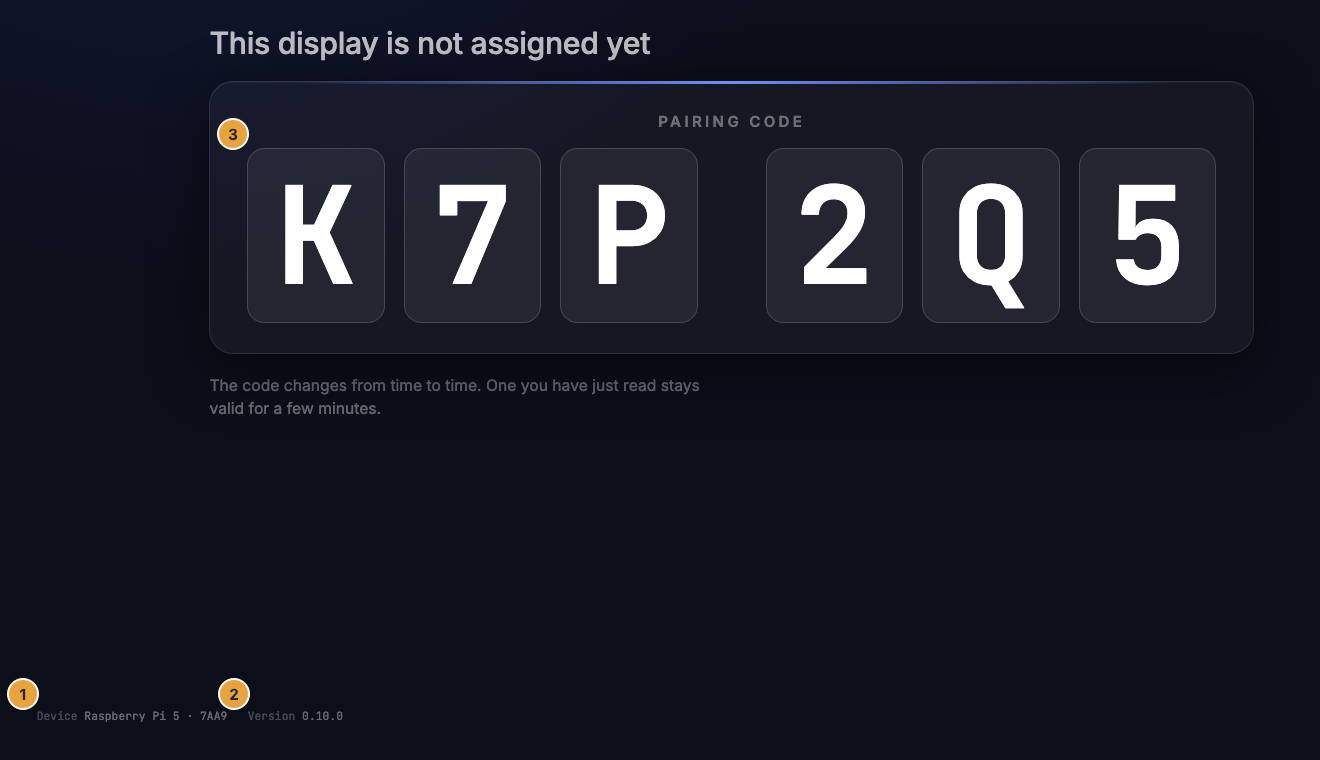
| A device does not respond, or there is no pairing code | The details from the footer line on the display: Device with the device identifier, Display with the display identifier, and Version with the version of the display software |
| Device defective, take-back, source code request | Type and serial number from the label on the underside of the housing (for example type SZP-L1) |
| Question about a generated proof of play | The document number of the file (SZN-<year>-<ten characters>) |
| Question about an order or a document | The order number or the document number, respectively |
| A message in the portal is unclear | A screenshot with the full wording of the message |
The footer line on the display is the line that support asks for first. It is shown small at the bottom edge, including while the device waits to be paired.
The support session in the portal
For a support session, a member of the operations team can temporarily view your portal on your behalf. It does not run covertly:
- The Support session active band appears above every page with the sentence “A member of our team is viewing this portal on your behalf. Ends in …”.
- The session ends automatically. End support session ends it immediately.
- In the Settings › Organization › Change log, the start and end of the session appear together with the reason. Every action from this period carries the note Impersonation, and the actor reads “Szenera-Support” together with the account it acted as. The log does not name the person on the operator's side.
- In addition, you receive a message of the Security category about the support access to the account, with start and end. It cannot be switched off.
If you did not expect the access, write to support@szenera.com immediately.
Maintenance windows
Announced work on the system is not a fault and requires nothing from you.
| Where | What you see |
|---|---|
| Portal | the band Scheduled from … to … |
| Display on site | a narrow band at the bottom with the note Maintenance in progress, and playback continues |
| Portal during the work | the Maintenance page, which keeps checking by itself and brings you back as soon as the portal is reachable again |
What only the operator can do
These cases cannot be solved in the portal, not even as an Owner.
| Case | Why the portal is not enough |
|---|---|
| Resetting two-factor sign-in when recovery codes and the authenticator are gone | Blocking and unblocking by a second Owner is not a reset of the second factor. |
| A one-time emergency access when nobody can get in anymore | It is never sent by email but handed over directly. |
| A domain already belongs to another organization | “This domain already belongs to another organization. Please contact our support.” A domain leads to exactly one sign-in method platform-wide. |
| An area carries Switched off (“Switched off for your organization.”) | A larger package does not change that. |
| An area carries Not in your agreement (“Not part of your agreement.”) | That is settled by the agreement, not by billing. |
| An app permanently shows the note Sample data | Then the entries come from the built-in sample data instead of a live fetch. |
| The trash empties earlier or later than expected | The default is 30 days. The period for your organization can differ. |
| An info page appears instead of the registration wizard | Then self-registration is not being offered right now. Existing access, sign-in, and invitations keep working unchanged. |
One case that the operator cannot solve either: permanently deleted media items are gone. Only what is still in the trash can be retrieved from it. After that, only a new upload helps.
What the operator does not see
The platform operations team works in a strictly separate interface of its own and sees your data only within the scope of its assignment. A look into your portal is exactly the support session above: visible, time-limited, logged.
Related
- Sign-in, password, and access — the cases around sign-in and access, before you write.
- Troubleshooting: where to start — what you can check on the display itself.
- Read and export the change log — see who did what and when.
Was this helpful?