Packages, trial, and what you pay for
You want to know what you pay for and what an additional display, a video wall, or an app costs extra.
- For
- anyone who decides which package the organization needs
- Prerequisite
- none. Billing in the portal is visible to Owners and Managers.
- Where in the portal
- Settings › Organization › Billing › Contract
On this page
Your contract is made of a package, a number of booked displays, and a billing period. Every new organization starts with a free 30-day trial. This page explains the packages, the trial, and everything that adds to your invoice.
The trial
Every new organization starts with a 30-day trial: one display in the Pro package, free of charge, without payment details. The badge Trial · … days left next to the page title shows how many days are left.
- The trial ends on its own, with no cancellation and no notice period.
- Only the one display is free. Whatever you book in addition during the trial is billed right away, and that needs a payment method.
- Changing the package ends the trial, and billing starts on that day. The order says so before you confirm.
We remind you seven days and one day before the end.
| At the end of the trial | What happens |
|---|---|
| A payment method is on file | Everything keeps running without a break. |
| No payment method is on file | The organization is frozen. The displays keep playing, but you can change things only after adding a payment method. |
| 14 more days without a payment method | Access is put on hold. |
The four packages
| Package | Features |
|---|---|
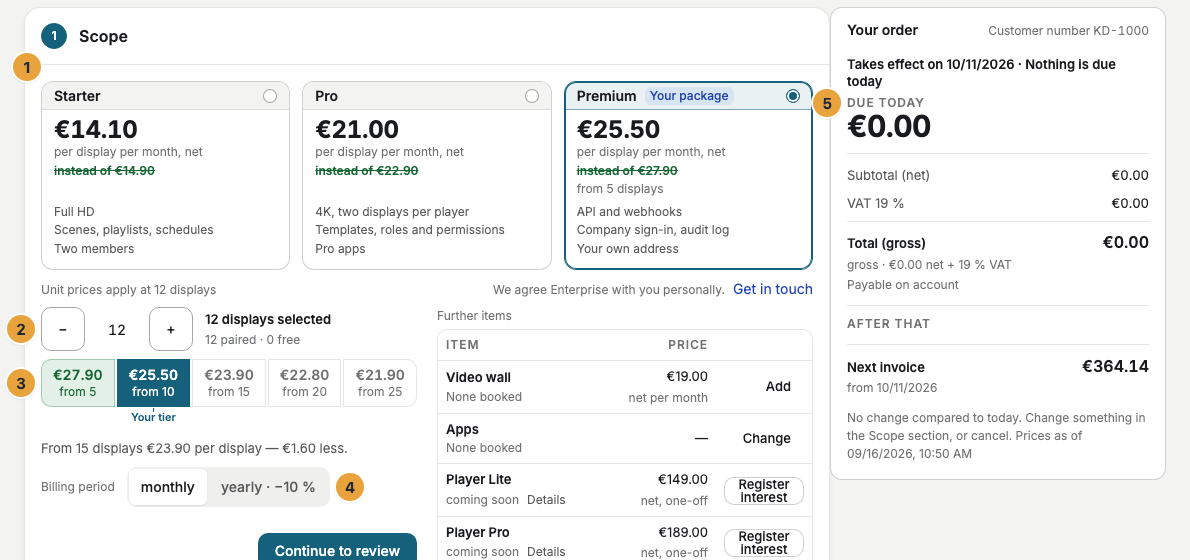
| Starter | Full HD · Scenes, playlists, schedules · Two members |
| Pro | 4K, two displays per player · Templates, roles and permissions · Pro apps |
| Premium | API and webhooks · Company sign-in, audit log · Your own address |
| Enterprise | “We agree Enterprise with you personally.” |
Your own brand comes with Pro, your own address with Premium. Premium starts at five displays. Which apps each package includes is explained in Find the right app.
Booked displays
Every display occupies one booked seat: a second display on the same player, and every web display in a browser, too. The Displays row on the Contract tab shows how many are used, such as “3 of 5 booked displays paired”. If all are taken, a new pairing offers Book another display right in the dialog.
The price per display follows volume tiers, and your tier applies to all your displays, not only to those above the threshold. Pay monthly or yearly, the latter with a discount. All prices are net plus VAT.
What else adds to the invoice
| What | How it is billed |
|---|---|
| Video walls | Per video wall, in every package. Its displays still occupy one seat each. |
| Add-on apps | A monthly price per app. A cancellation takes effect at the end of the period. |
| Player Lite and Player Pro | A one-off purchase |
| Storage | Included. Every seat adds a share to a shared pool. |
How far back you can look
| Package | History in analytics | Screenshots kept | Days on the playback timeline |
|---|---|---|---|
| Starter | none, the last seven days remain visible | 1 day | none |
| Pro | 7 days | 7 days | 7 days |
| Premium | 30 days | 30 days | 30 days |
| Enterprise | 90 days | 90 days | 90 days |
Advertising with your own advertisers and their proofs needs Premium. Taking part in the ad network works in every package, see What is retail media?.
Locks in the portal
A function outside your package shows a lock with a label and View packages.
| Label | What it means | Who helps |
|---|---|---|
| From Pro, From Premium, Premium only | The function belongs to a larger package. | Billing |
| Bookable as an extra | You can book it for a monthly price. | Billing |
| Not included | Your package doesn't include it. | Billing |
| Stays free | You keep an app your package no longer includes. | Nobody, everything is fine |
| Switched off | We switched the function off for your organization. | Support |
| Not in your agreement | The function isn't part of your agreement. | Support |
A lock never takes away what you already set up. Keys, webhooks, sign-in providers, and addresses keep working, and you can always remove them. Only creating something new is locked.
Related
Was this helpful?