Create an advertiser
A manufacturer wants to advertise on your displays, and you create it with brands, industry, and contact persons.
- For
- anyone who looks after direct business, for example an auto repair shop that sells airtime to a tire manufacturer, or a pharmacy doing so for the manufacturer of its own brand
- Prerequisite
- The permission Manage advertisers, which Owner and Manager hold by default. Premium package or higher, since direct business is part of these packages.
- Where in the portal
- Advertising › Advertisers tab › Create advertiser button
On this page
Create the manufacturer or brand that wants to advertise on your displays as an advertiser, with its brands, industry, and the contacts who receive the proof by email after each month.
An advertiser is the party whose creatives run and who receives the proof. Szenera creates the advertisers of the network. They do not appear in your list.
Steps
- Open Advertising and switch to the Advertisers tab.
- Click Create advertiser. The dialog opens with the sentence “Brands, industry and who receives the proofs.”
- Enter the Name as it should appear in the proof.
- Choose the Industry. It determines exclusions and the mandatory text: Creatives in the industries Medicines and Medical devices need a mandatory text under the German Therapeutic Products Advertising Act before they may run.
- Under Brands, enter the names under which the advertiser appears, and click Add for each brand. The brands appear in the proof.
- Under Contacts, add the persons with Name and Email. For each person who should receive proofs, select the receives proofs checkbox.
- Click Create. The message reads The advertiser has been created.
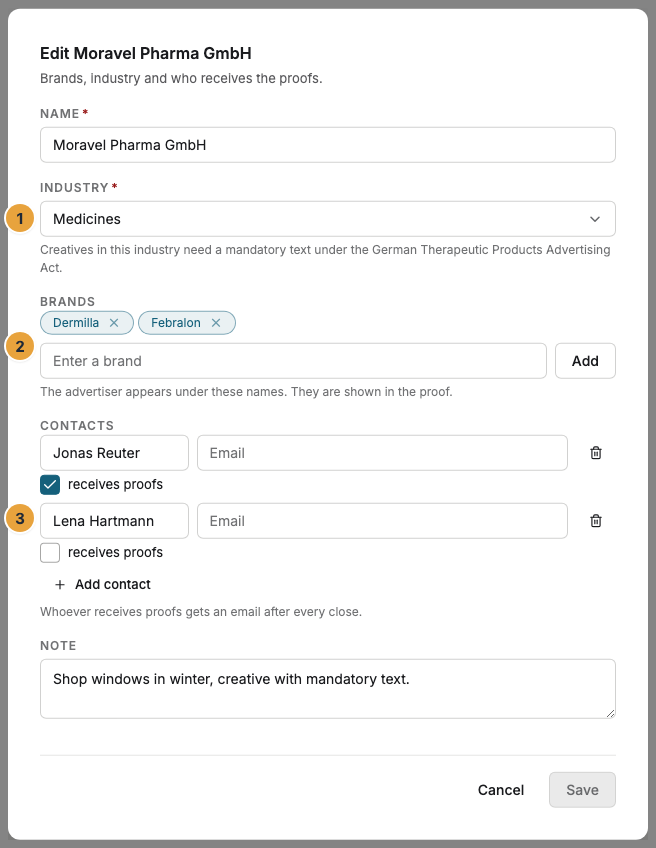
1 Industry with the note on the mandatory text · 2 Brands · 3 Contact persons with receives proofs
Options
| Field | Limit | Purpose |
|---|---|---|
| Name | at most 120 characters | Header of every proof and every campaign report |
| Industry | one from the list | Mandatory text, and in the ad network the exclusion by locations |
| Brands | up to 20 | Mentioned in the proof |
| Contacts | up to 10 | Delivery of the proofs by email to everyone with receives proofs |
| Note | at most 1,000 characters | For your team only |
The industries: Cosmetics, Personal care, Food supplements, Medicines, Medical devices, Food and beverages, Automotive, Household, Services, Retail, and Other.
Edit in the row opens the same dialog. The row menu lets you choose Create ad campaign for the advertiser or Archive it: Ad campaigns and proofs stay readable, but there are no new ad campaigns or bookings for it. What is already booked keeps running until you pause or end it. Its bookings can no longer be changed or resumed.
The email addresses of the contact persons are personal data that you maintain for your business with the advertiser. Enter only persons who are meant to receive the proofs.
Check the result
The Active list shows the advertiser with Brands: …, Proofs to … with the recipients, and the number of its ad campaigns. If it has an industry with a mandatory text, the Mandatory text badge appears on its row.
If something goes wrong
| Symptom | Cause | Solution |
|---|---|---|
| “Your own advertisers and ad campaigns are available from the Premium package.” | Your package does not include direct business. Existing items stay readable and can be paused, and network participation is open to every package. | View packages: Change your contract. |
| Nobody receives proofs on the row | The receives proofs checkbox is not selected for any contact person. | Edit the advertiser and select the checkbox for at least one person. |
| “The advertiser is archived and gets no new bookings. What is running can only be paused or ended.” | It is archived. There are no new ad campaigns and bookings, no changes to bookings, and no resuming for it. | Create the ad campaign and booking for an active advertiser. |
| The Advertisers tab is missing. | Your account lacks the permission View advertisers. | Permissions by role. |
Related
Was this helpful?