Analyze ad campaigns
Fulfillment, pacing, and forecast of an ad campaign, where and when it delivered, and what did not count.
- For
- anyone who has to report to an advertiser, for example a pharmacy that wants to tell the manufacturer of its own brand at mid-month whether the commitment holds
- Prerequisite
- The permission View ad campaigns, held by Owner and Manager by default. The view appears as soon as your organization has ad campaigns or takes part in the ad network.
- Where in the portal
- Analytics › What ran? › Ad campaigns view, the same delivery under Advertising › ad campaign › Delivery tab
On this page
For each ad campaign, analytics shows whether it delivers what was promised: how many valid plays there are so far, where delivery is heading, where and when it ran, and what didn’t count.
Steps
- Open Analytics, switch to the What ran? tab, and choose the Ad campaigns view. Its name states the number of running ad campaigns, for example Ad campaigns (3).
- Choose the ad campaign under Choose campaign. Running ones come first, and within them your direct business comes before the network. Drafts and ad campaigns that ended early are missing, because they delivered nothing.
- Read the header: the phase with “running · day … of …”, spot length, displays, and commitment. The day counts from one, and today counts too: On the first day of the run, it says “day 1”.
- Read the delivery. For your direct business, it appears in full. For a network booking, it shows your share of it (see Network bookings).
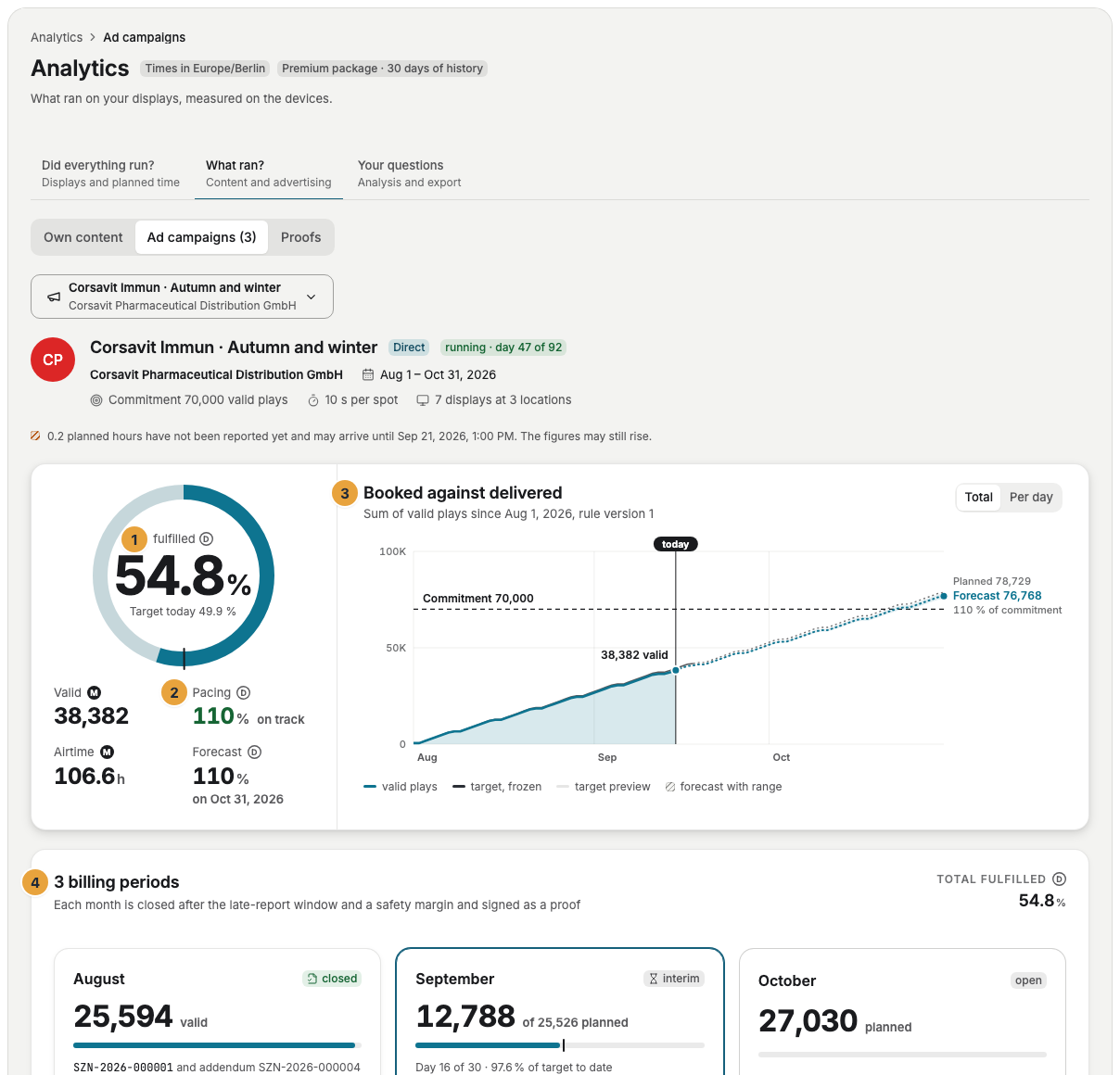
1 Fulfillment · 2 Pacing and forecast · 3 Booked against delivered · 4 Billing periods
Options
What the delivery shows
| Part | What it says |
|---|---|
| fulfilled (ring) | The fulfillment: valid delivery in the unit of the commitment divided by the commitment. Next to it is Target today, the share that was due by today. Without a quantity commitment, it says “No quantity committed, only the frequency is booked”. If the bookings commit in different units, for example one in plays and one in airtime, there is no combined fulfillment, and that is stated there too. Counting runs up to yesterday: On the first day of an ad campaign, a note below states on which day the first figures arrive. |
| Valid, Airtime | The valid plays and their duration. |
| Pacing | Fulfillment divided by the share due by today. The ad campaign is then on track, slightly behind, or behind. |
| Forecast | Where the delivery is heading by the last day, with a range. |
| Booked against delivered | The sum of valid plays against the frozen target and the commitment, either as Total or Per day. The subtitle names the version of the validity rule. |
| Billing periods | One card per month: closed, close pending, interim for the running month, or open for an upcoming one, with the day of the closing. The running month states “Day … of …” like the header, so on October 22 it says “Day 22 of 31”, even though its figures run up to yesterday. |
| Where and when it was delivered | The distribution by Location, Placement, Daypart, Region, and Venue type, optionally in Plays, Airtime, or Contacts. |
| Failures by reason | Plays that do not count, per reason, plus what is still open and what counted without panel confirmation. |
| Contacts | Modeled from the audience of the locations, by grade of the data, with the version of the contact model. |
| Proofs | The signed closings, addenda, and interim proofs of this ad campaign: Proofs and links for advertisers. |
The target is set during planning: At the start of each hour, it is recorded how many plays the booking receives on each display according to the program. If the program is changed later, the target for past hours stays as it was. That way, the delivery is compared with the plan that applied at the time of the play.
In your own view, contacts from self-reported data count as well, marked as estimated. The proof and everything the advertiser sees count only contacts of grades A and B. If self-reported data counts, the note under the figure reads: “Contacts from self-reported data (grade C) are included and estimated. The proof and the advertiser report do not count them.”
Network bookings
A booking of the ad network belongs to the network and its advertiser. For it, this page shows On your displays: your share of the network booking in the chosen period, with Valid plays, Airtime, Failure rate, the plays per day, valid and invalid, and Per display. Your credit note follows from the valid plays on your displays: Join the ad network.
Check the result
If the ring stands below the target today, Failures by reason and Where and when it was delivered show the cause: a display that does not report, a TV on standby during opening hours, or ad slots that are too rarely free. The day of the affected display shows the details: Check a display’s day.
If something goes wrong
| Symptom | Cause | Solution |
|---|---|---|
| No campaign on your displays yet | No ad campaign is running that reaches your displays. | Book an ad campaign. |
| “… planned hours have not been reported yet and may arrive until ….” | Displays have not reported everything yet. The figures may still rise. | Look again after the deadline. |
| This network booking has not started yet | Its period lies in the future. | From the first day, this page shows what ran on your displays. |
| No delivery for this campaign here | Network bookings belong to the network. | Your share appears in the Ad campaigns view of Analytics. |
| The Ad campaigns view is missing. | Your organization has no ad campaign and does not take part in the network, or your account lacks View ad campaigns. | What is retail media? |
Related
Was this helpful?